API แยกและประเมินข้อมูล AI Resume / CV
API นี้ประมวลผลเอกสาร Curriculum Vitae (CV) (PDF, JPG, PNG) หรือ Resume และแยกข้อมูลที่มีโครงสร้างออกมา รวมถึงรายละเอียดส่วนบุคคล ประวัติการศึกษา ประสบการณ์ทำงาน และทักษะ
ต้องการประเมิน CV ของคุณโดยไม่ต้องเขียนโค้ดใช่ไหม? ลองใช้ เครื่องมือประเมิน CV ฟรี ของเรา - ไม่ต้องใช้ API key, ได้รับผลตอบรับทันทีพร้อมคะแนนโดยละเอียด, ตรวจสอบความเข้ากันได้กับ ATS และข้อเสนอแนะในการปรับปรุง
เราได้เพิ่มฟีเจอร์ การประเมิน CV ที่ครอบคลุมเพื่อช่วยผู้หางานปรับปรุงเรซูเม่ของพวกเขา:
- คะแนนรวม (0-100) พร้อมการแบ่งคะแนนตามส่วน
- การตรวจสอบความเข้ากันได้กับ ATS - ตรวจสอบให้แน่ใจว่า CV ของคุณผ่านระบบติดตามผู้สมัคร (Applicant Tracking Systems)
- การวิเคราะห์จุดแข็งและจุดอ่อน
- ข้อเสนอแนะในการปรับปรุงที่จัดลำดับความสำคัญ พร้อมตัวอย่าง
- คีย์เวิร์ดที่แนะนำ เพื่อการจับคู่ตำแหน่งงานที่ดีขึ้น
- คำแนะนำที่เหมาะสมกับอุตสาหกรรม
ลองเดโม API
ใช้เดโมแบบโต้ตอบนี้เพื่อทดสอบ API เลือก API key ของคุณ อัปโหลดเอกสาร CV และดูผลลัพธ์ JSON ดิบ
ทดลองใช้ AI Demo
เข้าสู่ระบบหรือสร้างบัญชีฟรีเพื่อใช้งาน AI Demo และสำรวจ API ที่ทรงพลังของเรา
รับ 50 เครดิตฟรี (IC) เมื่อสมัครสมาชิก!
โปรโมชันหมดเขต 31 ธันวาคม 2568
Endpoint API
| Endpoint | Method | คำอธิบาย | ราคา |
|---|---|---|---|
/v3/store/ocr/curriculum-vitae/ocr/cv, /ocr/cv-port | POST | แยกข้อมูลที่มีโครงสร้างจาก CVs | 1 IC ต่อหน้า |
ตัวอย่างโค้ด
ตัวอย่าง CV
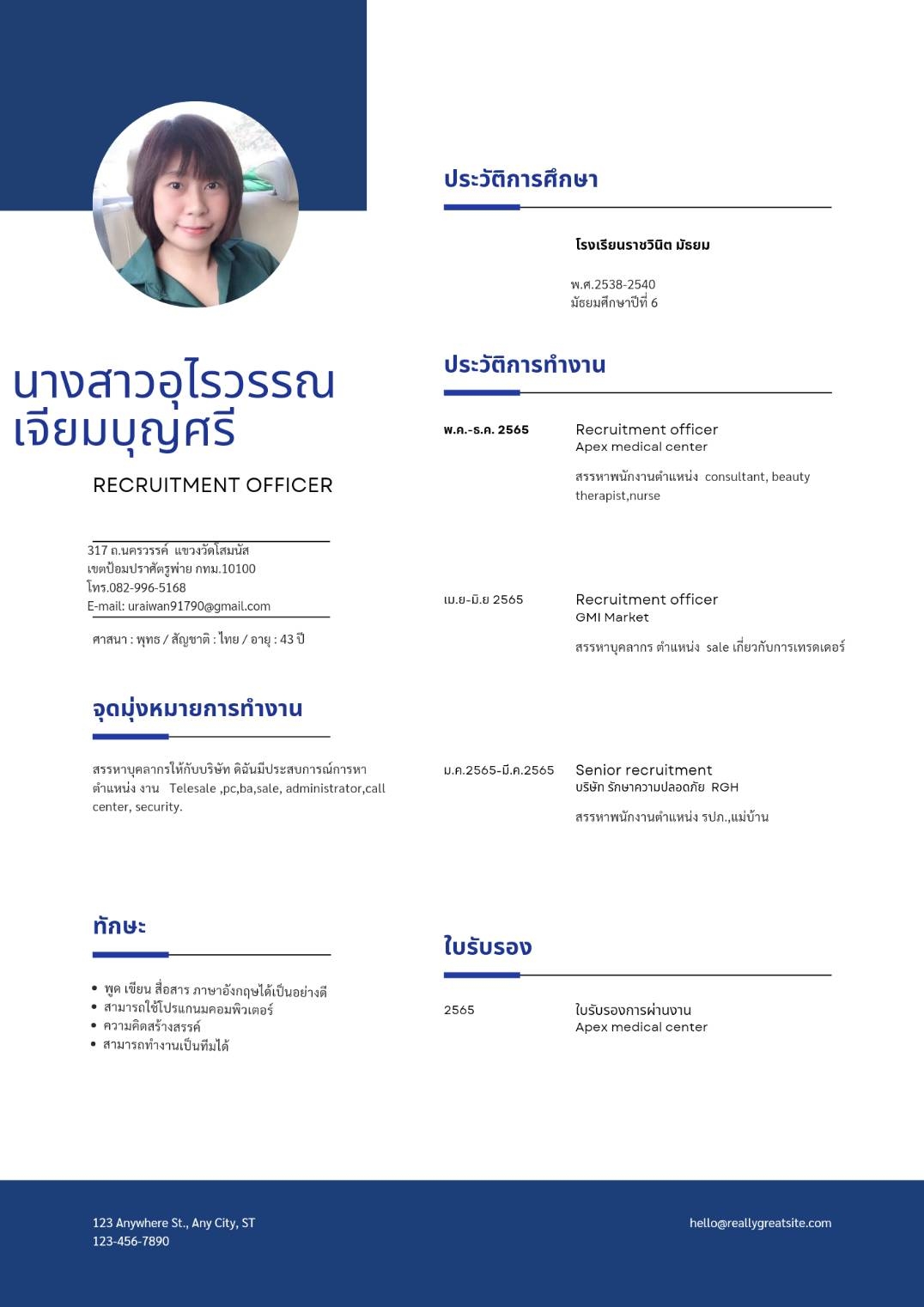
Request:
    curl -X POST https://api.iapp.co.th/ocr/cv
        -H "apikey: YOUR_API_KEY"
        -F "file=@/path/to/sample_cv_2.jpg"
Response:
{
    "personalInformation": {
        "name": "นางสาวอุไรวรรณ เจียมบุญศรี",
        "address": "317 ถ.นครวรรค์ แขวงวัดโสมนัส เขตป้อมปราศัตรูพ่าย กทม. 10100",
        "phoneNumbers": ["082-996-5168"],
        "email": "uraiwan91790@gmail.com",
        "religion": "พุทธ",
        "nationality": "ไทย",
        "age": "43"
    },
    "education": [
        {
            "school": "โรงเรียนราชวินิต มัธยม",
            "level": "มัธยมศึกษาปีที่ 6",
            "year": "2538-2540"
        }
    ],
    "workExperience": [
        {
            "title": "Recruitment officer",
            "company": "Apex medical center",
            "startDate": "May 2022",
            "endDate": "December 2022",
            "roles": ["สรรหาพนักงานตำแหน่ง consultant, beauty therapist, nurse"]
        },
        {
            "title": "Recruitment officer",
            "company": "GMI Market",
            "startDate": "April 2022",
            "endDate": "June 2022",
            "roles": ["สรรหาบุคลากร ตำแหน่ง sale เกี่ยวกับการเทรดเดอร์"]
        },
        {
            "title": "Senior recruitment",
            "company": "บริษัท รักษาความปลอดภัย RGH",
            "startDate": "January 2022",
            "endDate": "March 2022",
            "roles": ["สรรหาพนักงานตำแหน่ง รปภ.,แม่บ้าน"]
        }
    ],
    "skillsAndQualifications": {
        "languages": {
            "english": "พูด เขียน สื่อสาร ภาษาอังกฤษได้เป็นอย่างดี"
        },
        "computerSkills": ["สามารถใช้โปรแกนมคอมพิวเตอร์"],
        "communicationSkills": []
    },
    "possibleSkillAndQualificationsByAI": [
        "Recruiting",
        "Applicant Tracking Systems (ATS)",
        "Interviewing",
        "Talent Acquisition",
        "Onboarding",
        "HRIS",
        "Performance Management",
        "Employee Relations",
        "Sales",
        "Trading",
        "Security",
        "Customer Service",
        "Teamwork",
        "Communication"
    ],
    "additionalInformation": {
        "customerServiceSkills": null,
        "assessment": null
    },
    "confidence": {
        "personalInformation": 0.95,
        "education": 0.9,
        "workExperience": 0.9,
        "skillsAndQualifications": 0.9,
        "possibleSkillAndQualificationsByAI": 0.85,
        "additionalInformation": 0.9
    }
}
คุณสมบัติ
-
การประมวลผล CV: แยกข้อมูลที่มีโครงสร้างจาก CV รวมถึงรายละเอียดส่วนบุคคล การศึกษา ประสบการณ์ทำงาน ทักษะ และทักษะที่อาจเป็นไปได้ที่ AI แนะนำ
-
การประเมินด้วย AI (ใหม่): วิเคราะห์ CV อย่างครอบคลุมพร้อม:
- คะแนนรวมและการแบ่งคะแนนตามส่วน
- การตรวจสอบความเข้ากันได้กับ ATS (Applicant Tracking System)
- การระบุจุดแข็งและจุดอ่อน
- ข้อเสนอแนะในการปรับปรุงที่จัดลำดับความสำคัญพร้อมตัวอย่าง
- คีย์เวิร์ดที่แนะนำเพื่อการจับคู่ตำแหน่งงานที่ดีขึ้น
- คำแนะนำที่เหมาะสมกับอุตสาหกรรม
-
คะแนนความมั่นใจ: แต่ละฟิลด์ที่แยกออกมามีคะแนนความมั่นใจ (0-1) เพื่อระบุความน่าเชื่อถือของการแยกข้อมูล
-
รูปแบบที่รองรับ: ยอมรับไฟล์ PDF, JPG, PNG และ JPEG
ผลลัพธ์การประเมิน CV
API จะส่งคืนออบเจกต์ evaluation พร้อมการวิเคราะห์โดยละเอียด:
ประเภทคะแนน
| ประเภท | คำอธิบาย |
|---|---|
| overall | คะแนนคุณภาพ CV โดยรวม (0-100) |
| personalInfo | ความสมบูรณ์ของข้อมูลติดต่อ |
| education | การนำเสนอประวัติการศึกษา |
| workExperience | ประวัติการทำงานพร้อมความสำเร็จ |
| skills | การจัดระเบียบและความเกี่ยวข้องของทักษะ |
ฟิลด์การประเมิน
{
  "evaluation": {
    "scores": {
      "overall": 72,
      "personalInfo": { "score": 85, "feedback": "..." },
      "education": { "score": 70, "feedback": "..." },
      "workExperience": { "score": 65, "feedback": "..." },
      "skills": { "score": 75, "feedback": "..." }
    },
    "experienceLevel": "mid",
    "totalYearsOfExperience": 6,
    "atsCompatibility": {
      "score": 70,
      "issues": ["ขาดคีย์เวิร์ดเฉพาะเจาะจงกับงาน", "..."],
      "suggestions": ["เพิ่มคีย์เวิร์ดเฉพาะอุตสาหกรรม", "..."]
    },
    "strengths": ["ความก้าวหน้าในอาชีพที่ชัดเจน", "..."],
    "weaknesses": ["ขาดความสำเร็จที่วัดผลได้", "..."],
    "missingSections": ["สรุปความเป็นมืออาชีพ", "ใบรับรอง", "..."],
    "improvements": [
      {
        "section": "workExperience",
        "priority": "high",
        "issue": "คำอธิบายงานขาดความสำเร็จที่วัดผลได้",
        "suggestion": "เพิ่มตัวเลขและเปอร์เซ็นต์ที่เฉพาะเจาะจง",
        "example": "นำทีม 8 คน บรรลุเป้าหมายรายไตรมาส 125%"
      }
    ],
    "suggestedKeywords": ["การเติบโตของรายได้", "การบริหารจัดการ Pipeline", "..."],
    "industryFitSuggestions": ["การบริหารการขาย", "การพัฒนาธุรกิจ", "..."],
    "executiveSummary": "CV นี้แสดงถึงมืออาชีพระดับกลาง..."
  }
}
ตัวอย่างโค้ด
Curl
curl -X POST https://api.iapp.co.th/v3/store/ocr/curriculum-vitae \
    -H "apikey: YOUR_API_KEY" \
    -F "file=@/path/to/file.jpg"
Python
import requests

url = "https://api.iapp.co.th/ocr/cv"

payload = {}
files=[
  ('file',('sample_cv_2.jpg',open('sample_cv_2.jpg','rb'),'application/pdf'))
]
headers = {"apikey": "YOUR_API_KEY"}

response = requests.request("POST", url, headers=headers, data=payload, files=files)

print(response.text)
JavaScript
const axios = require("axios")
const FormData = require("form-data")
const fs = require("fs")

let data = new FormData()
data.append("file", fs.createReadStream("sample_cv_2.jpg"))

let config = {
    method: "post",
    maxBodyLength: Infinity,
    url: "https://api.iapp.co.th/ocr/cv",
    headers: {
        apikey: "YOUR_API_KEY",
        ...data.getHeaders(),
    },
    data: data,
}

axios
    .request(config)
    .then((response) => {
        console.log(JSON.stringify(response.data))
    })
    .catch((error) => {
        console.log(error)
    })
PHP
<?php

$curl = curl_init();

curl_setopt_array($curl, array(
  CURLOPT_URL => 'https://api.iapp.co.th/ocr/cv',
  CURLOPT_RETURNTRANSFER => true,
  CURLOPT_ENCODING => '',
  CURLOPT_MAXREDIRS => 10,
  CURLOPT_TIMEOUT => 0,
  CURLOPT_FOLLOWLOCATION => true,
  CURLHTTP_VERSION => CURL_HTTP_VERSION_1_1,
  CURLOPT_CUSTOMREQUEST => 'POST',
  CURLOPT_POSTFIELDS => array('file'=> new CURLFILE('sample_cv_2.jpg')),
  CURLOPT_HTTPHEADER => array(
    'apikey: YOUR_API_KEY'
  ),
));

$response = curl_exec($curl);

curl_close($curl);
echo $response;
Swift
let parameters = [
  [
    "key": "file",
    "src": "sample_cv_2.jpg",
    "type": "file"
  ]] as [[String: Any]]

let boundary = "Boundary-\(UUID().uuidString)"
var body = Data()
var error: Error? = nil
for param in parameters {
  if param["disabled"] != nil { continue }
  let paramName = param["key"]!
  body += Data("--\(boundary)\r\n".utf8)
  body += Data("Content-Disposition:form-data; name=\"\(paramName)\"".utf8)
  if param["contentType"] != nil {
    body += Data("\r\nContent-Type: \(param["contentType"] as! String)".utf8)
  }
  let paramType = param["type"] as! String
  if paramType == "text" {
    let paramValue = param["value"] as! String
    body += Data("\r\n\r\n\(paramValue)\r\n".utf8)
  } else {
    let paramSrc = param["src"] as! String
    let fileURL = URL(fileURLWithPath: paramSrc)
    if let fileContent = try? Data(contentsOf: fileURL) {
      body += Data("; filename=\"\(paramSrc)\"\r\n".utf8)
      body += Data("Content-Type: \"content-type header\"\r\n".utf8)
      body += Data("\r\n".utf8)
      body += fileContent
      body += Data("\r\n".utf8)
    }
  }
}
body += Data("--\(boundary)--\r\n".utf8);
let postData = body


var request = URLRequest(url: URL(string: "https://api.iapp.co.th/ocr/cv")!,timeoutInterval: Double.infinity)
request.addValue("YOUR_API_KEY", forHTTPHeaderField: "apikey")
request.addValue("multipart/form-data; boundary=\(boundary)", forHTTPHeaderField: "Content-Type")

request.httpMethod = "POST"
request.httpBody = postData

let task = URLSession.shared.dataTask(with: request) { data, response, error in
  guard let data = data else {
    print(String(describing: error))
    return
  }
  print(String(data: data, encoding: .utf8)!)
}

task.resume()
Kotlin
val client = OkHttpClient()
val mediaType = "text/plain".toMediaType()
val body = MultipartBody.Builder().setType(MultipartBody.FORM)
  .addFormDataPart("file","sample_cv_2.jpg",
    File("sample_cv_2.jpg").asRequestBody("application/octet-stream".toMediaType()))
  .build()
val request = Request.Builder()
  .url("https://api.iapp.co.th/ocr/cv")
  .post(body)
  .addHeader("apikey", "YOUR_API_KEY")
  .build()
val response = client.newCall(request).execute()
Java
OkHttpClient client = new OkHttpClient().newBuilder()
  .build();
MediaType mediaType = MediaType.parse("text/plain");
RequestBody body = new MultipartBody.Builder().setType(MultipartBody.FORM)
  .addFormDataPart("file","sample_cv_2.jpg",
    RequestBody.create(MediaType.parse("application/octet-stream"),
    new File("sample_cv_2.jpg")))
  .build();
Request request = new Request.Builder()
  .url("https://api.iapp.co.th/ocr/cv")
  .method("POST", body)
  .addHeader("apikey", "YOUR_API_KEY")
  .build();
Response response = client.newCall(request).execute();
Dart
var headers = {
  'apikey': 'YOUR_API_KEY'
};
var request = http.MultipartRequest('POST', Uri.parse('https://api.iapp.co.th/ocr/cv'));
request.files.add(await http.MultipartFile.fromPath('file', 'sample_cv_2.jpg'));
request.headers.addAll(headers);

http.StreamedResponse response = await request.send();

if (response.statusCode == 200) {
  print(await response.stream.bytesToString());
}
else {
  print(response.reasonPhrase);
}
ราคา
| ชื่อบริการ AI API | Endpoint | IC ต่อหน้า | On-Premise |
|---|---|---|---|
| AI CV OCR and Information Extraction API | iapp_cv_ocr | 1 IC/หน้า | ติดต่อ |